Building Heritage Digital Twins with Open-Source Tools
Human-in-the-Loop Semantic Knowledge Production from Documentary Evidence
What is a Heritage Digital Twin
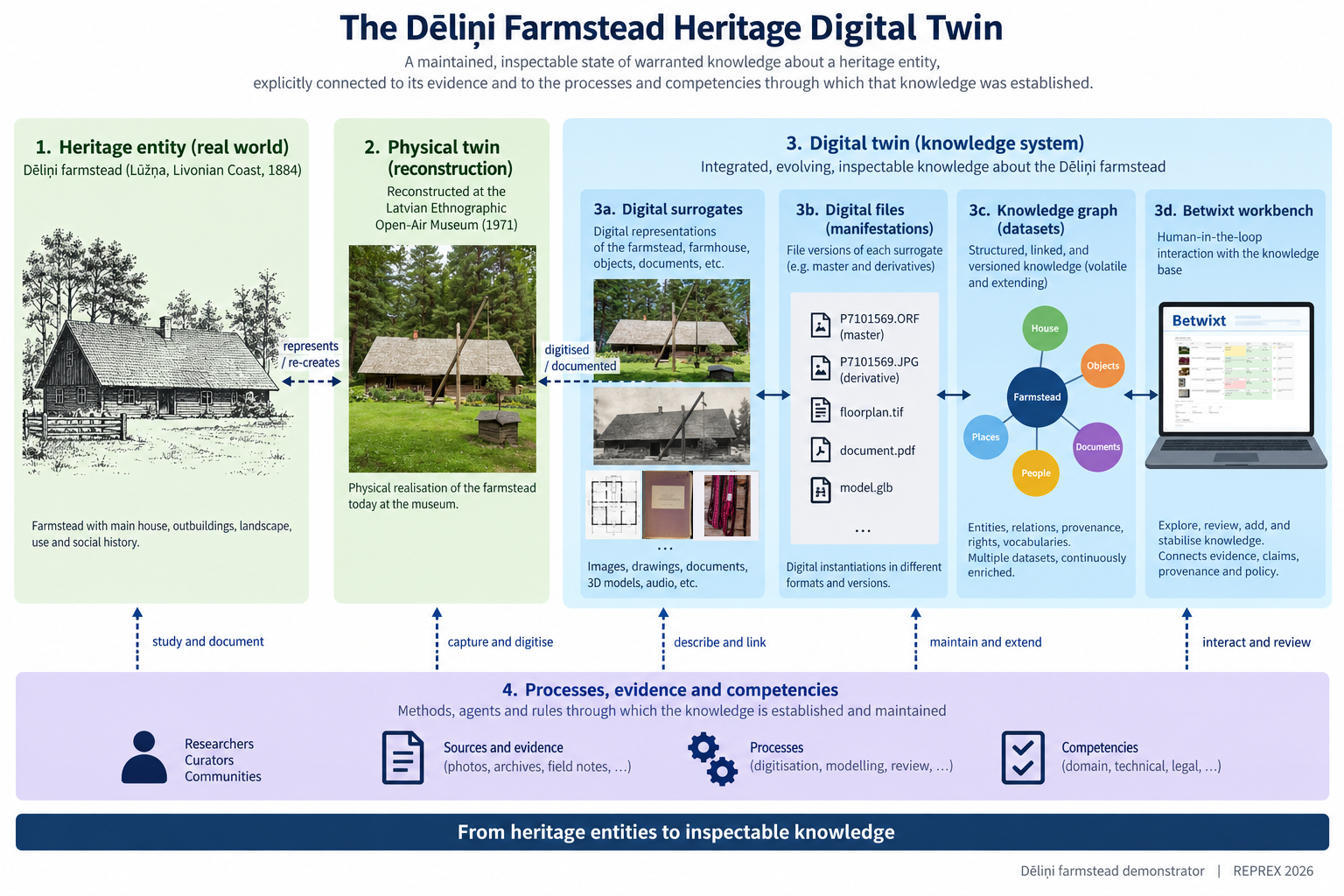
A very small collection: Delini artefacts
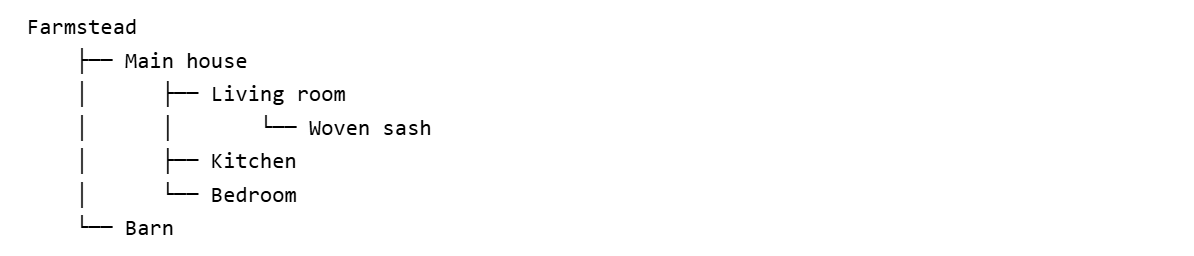
Our starting point
Three heritage artefacts and two documentary records.
For now, we simply observe what we have.
From observations to knowledge
Informative data and usable knowledge
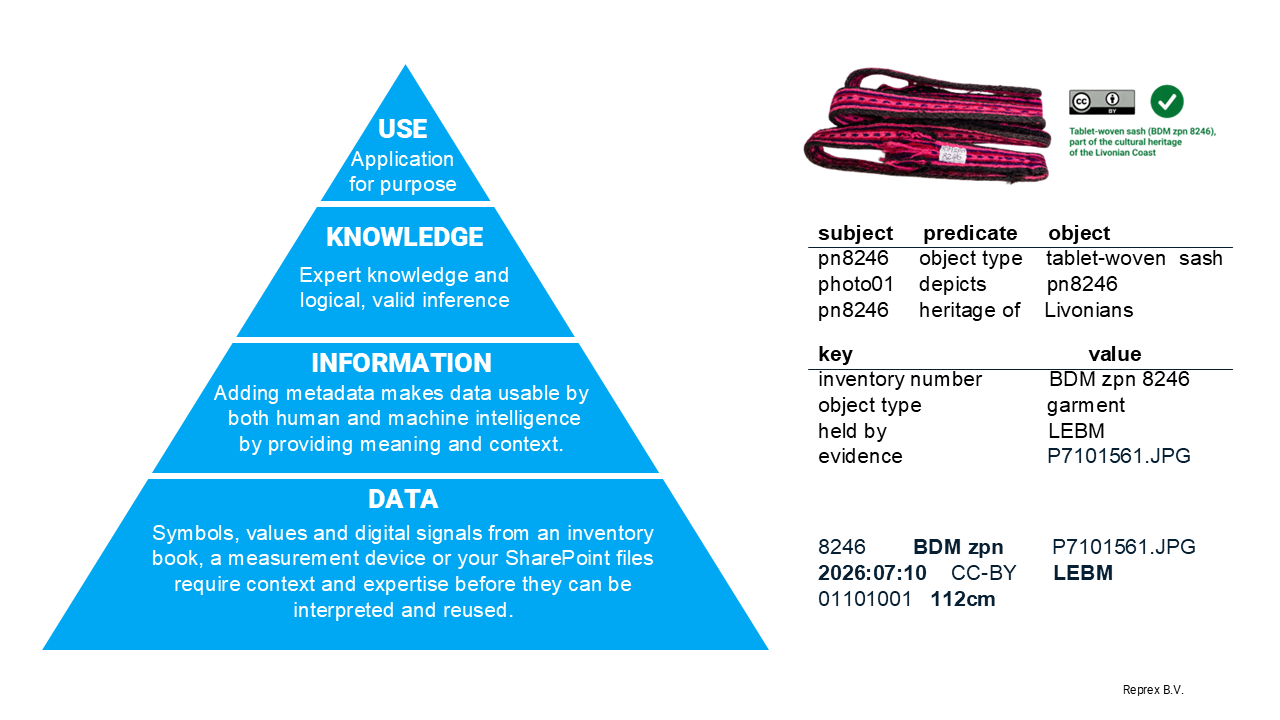
Atomic semantic assertions
An elementary semantic assertion can be represented as
\[(s,p,v)\]
where \(s\) is a subject, \(p\) a predicate, and \(v\) an asserted value (measured coordinates here: 56°59'35.38"N, 24°15'23.25"E) or related entity (photo001.jpg → Photograph 1).
| subject | predicate | value |
|---|---|---|
P7101561.jpg |
instantiation_of |
Photograph 1 |
Photograph 1 |
depicts |
Delini farmhouse |
Delini farmhouse |
instance_of |
farmhouse |
Delini farmhouse |
coordinates |
56°59'35"N, 24°15'23"E |
Betwixt: Review candidates
Betwixt: Review draft
Betwixt: Review draft
Betwixt: create a wide tabular dataset
| row_number | plane | subject | label | instance_of | heritage_of |
|---|---|---|---|---|---|
| 1 | candidate | fuds:Q7328 | Delini farmstead | farmhouse | Livonians |
| 1 | reviewed | fuds:Q7328 | Delini farmstead | farmhouse | Livonians |
| 1 | status | corroborated | corroborated | corroborated | corroborated |
| 5 | candidate | bed (PLM 7201) | bed (PLM 7201) | bed | Livonians |
| 5 | reviewed | bed (PLM 7201) | bed (PLM 7201) | bed | Do not know |
| 5 | status | corroborated | corroborated | corroborated | deferred |
Betwixt: create a long tabular dataset
| A# | R# | plane | subject | predicate | value | status |
|---|---|---|---|---|---|---|
| 1 | 1 | candidate | fuds:Q7328 | label | Delini farmstead | corroborated |
| 2 | 1 | candidate | fuds:Q7328 | description | the farmhouse… | corroborated |
| 3 | 1 | reviewed | fuds:Q7328 | label | Delini farmstead | corroborated |
| 4 | 1 | reviewed | fuds:Q7328 | description | the farmhouse… | corroborated |
| 5 | 1 | candidate | fuds:Q7328 | instance_of | farmhouse | corroborated |
| 6 | 1 | candidate | fuds:Q7328 | heritage_of | Livonians | corroborated |
| 7 | 1 | reviewed | fuds:Q7328 | instance_of | farmhouse | corroborated |
| 8 | 1 | reviewed | fuds:Q7328 | heritage_of | Livonians | corroborated |
First Review: Read back with the app
Betwixt app
You can use Betwixt directly in your browser:
https://dataobservatory.shinyapps.io/betwixt/
Or download the Betwixt Windows App
https://usebetwixt.com/download/dist/betwixt_Setup_009.exe
Follow this presentation on your computer:
https://downloads.reprex.nl/2026/eadh2026/EADH_HDT_workshop.htm
Two ways to work
- Browser app — no installation required.
- Windows app — works locally on your computer.
Both provide the same review workflow used in the exercises.
Creating candidate assertions
@prefix btx: <https://usebetwixt.com/ns/> .
@prefix ex: <https://example.org/> .

ex:assertion12
    a btx:Assertion ;
    btx:rowNumber 3 ;
    btx:subject "bed (PLM 7201)" ;
    btx:predicate "heritage_of" ;
    btx:value "Do not know" ;
btx:status btx:Deferred .- This is standard RDF serialisation.
- See the Betwixt vignette.
- This format can be imported into graph databases and knowledge graphs such as Apache Jena Fuseki, Wikibase and Wikidata.
Exercises
Exercise One
Taxonomic classification
Review the proposed classification of each entity.
1. Open the exercise
EADH Workshop — Exercise 1
2. Examine the evidence
Use the image, description and available definition links to decide whether the proposed classification is appropriate.
3. Review the classification
Keep the proposed class when it is correct, select another available class when necessary, or choose Other… to enter a different value. You may also Defer or Reject an assertion.
4. Save your work
Save a draft when you have reviewed the candidate values.
Desktop app
Download Betwixt for Windows
Exercise Two
Parts and collections
Review the proposed relationships between entities.
1. Open the exercise
EADH Workshop — Exercise 2
2. Examine the evidence
Use the image, description and available definition links to understand how each entity relates to the others.
3. Review the relationships
Decide whether an entity is physically or structurally part of another entity, or whether it belongs to a curated collection. Correct, defer or reject assertions where necessary.
4. Save your work
Save a draft when you have reviewed the proposed relationships.
Exercise Three
Multiple assertions and context
Review several proposed assertions about the same entities.
1. Open the exercise
EADH Workshop — Exercise 3
2. Examine the evidence and context
Use the image, description, definition links and contextual information to interpret each proposed assertion.
3. Review the assertions
Review both the proposed instance_of classifications and heritage_of relationships. Some definitions now refer to an external knowledge source.
4. Save your work
Save a draft when you have reviewed the proposed assertions.
Exercise Four
Long-form assertions
Review two proposed assertions about the Dēliņi farmhouse.
1. Open the exercise
EADH Workshop — Exercise 4
2. Examine the structure
Unlike the previous exercise, the predicates are no longer separate columns. Each row contains a predicate and a value.
3. Review the assertions
Review the proposed predicate and value in each row. Together with the subject, they form an atomic semantic assertion.
4. Save your work
Save a draft when you have reviewed the proposed assertions.
Exercise Five
Translation review
Create and review alternative labels and descriptions in your own language.
1. Open the exercise
EADH Workshop — Exercise 5
2. Translate the descriptions
Use Google Translate to translate the supplied English descriptions into your mother tongue and paste the results into the alternative descriptions.
3. Add alternative labels
Give each object a meaningful short label in the same language.
4. Review the translations
Read the machine-generated translations critically and correct them where necessary.
5. Save your work
Save a draft when you are satisfied with your alternative labels and descriptions.
Translation Review: Read back with the app
Betwixt app
You can use Betwixt directly in your browser:
https://dataobservatory.shinyapps.io/betwixt/
Or download the Betwixt Windows App
https://usebetwixt.com/download/dist/betwixt_Setup_009.exe
from the workshop repository and run it locally.
Two ways to work
- Browser app — no installation required.
- Windows app — works locally on your computer.
Both provide the same review workflow used in the exercises.
Generative AI
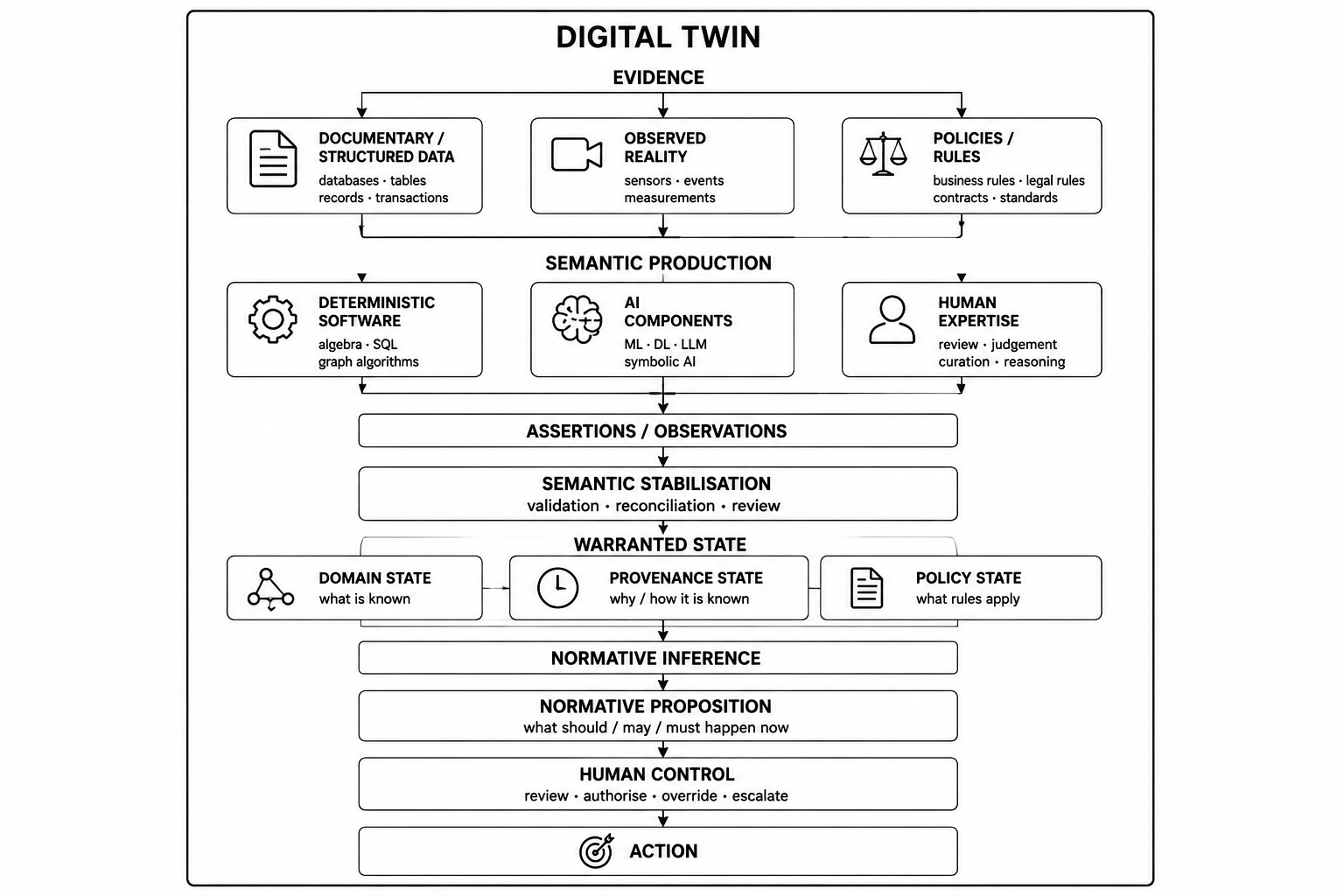
Discussion of agency and human control
Programmatic generation of review candidates
review_input <- tibble::tribble(
  ~page_id, ~label_en, ~description_en, ~label_hu, ~description_hu,
  ~page_url, ~thumbnail_url,
  ~subject, ~predicate, ~value, ~value_definition,
  "635780",
  "sweater, women's",
  "MuIS museum record 635780.",
  "női kardigán",
  "A MuIS 635780 számú múzeumi rekordja.",
  "https://www.muis.ee/museaalview/635780",
  paste0(
    "https://www.muis.ee/digitaalhoidla/api/meedia/pisipilt?",
    "id=ebc07930-f719-44f2-a108-6698bcecc20b"
  ),
  paste0(
    "https://www.muis.ee/digitaalhoidla/api/meedia/pisipilt?",
    "id=ebc07930-f719-44f2-a108-6698bcecc20b"
  ),
  "depicts",
  "300209900",
  "http://vocab.getty.edu/page/aat/300209900",
  "633053",
  "gloves",
  "MuIS museum record 633053.",
  "kesztyű",
  "A MuIS 633053 számú múzeumi rekordja.",
  "https://www.muis.ee/museaalview/633053",
  paste0(
    "https://www.muis.ee/digitaalhoidla/api/meedia/pisipilt?",
    "id=6440f24f-eaad-4cd4-84d7-1ae7a9d44d5a"
  ),
  paste0(
    "https://www.muis.ee/digitaalhoidla/api/meedia/pisipilt?",
    "id=6440f24f-eaad-4cd4-84d7-1ae7a9d44d5a"
  ),
  "depicts",
  "300148821",
  "http://vocab.getty.edu/page/aat/300148821",
  "635778",
  "shirt, women's",
  "MuIS museum record 635778.",
  "női ing",
  "A MuIS 635778 számú múzeumi rekordja.",
  "https://www.muis.ee/museaalview/635778",
  paste0(
    "https://www.muis.ee/digitaalhoidla/api/meedia/pisipilt?",
    "id=826c402e-c130-4860-b11e-9538bd403ecf"
  ),
  paste0(
    "https://www.muis.ee/digitaalhoidla/api/meedia/pisipilt?",
    "id=826c402e-c130-4860-b11e-9538bd403ecf"
  ),
  "depicts",
  "300212499",
  "http://vocab.getty.edu/page/aat/300212499"
)
—>
Provenance
Provenance
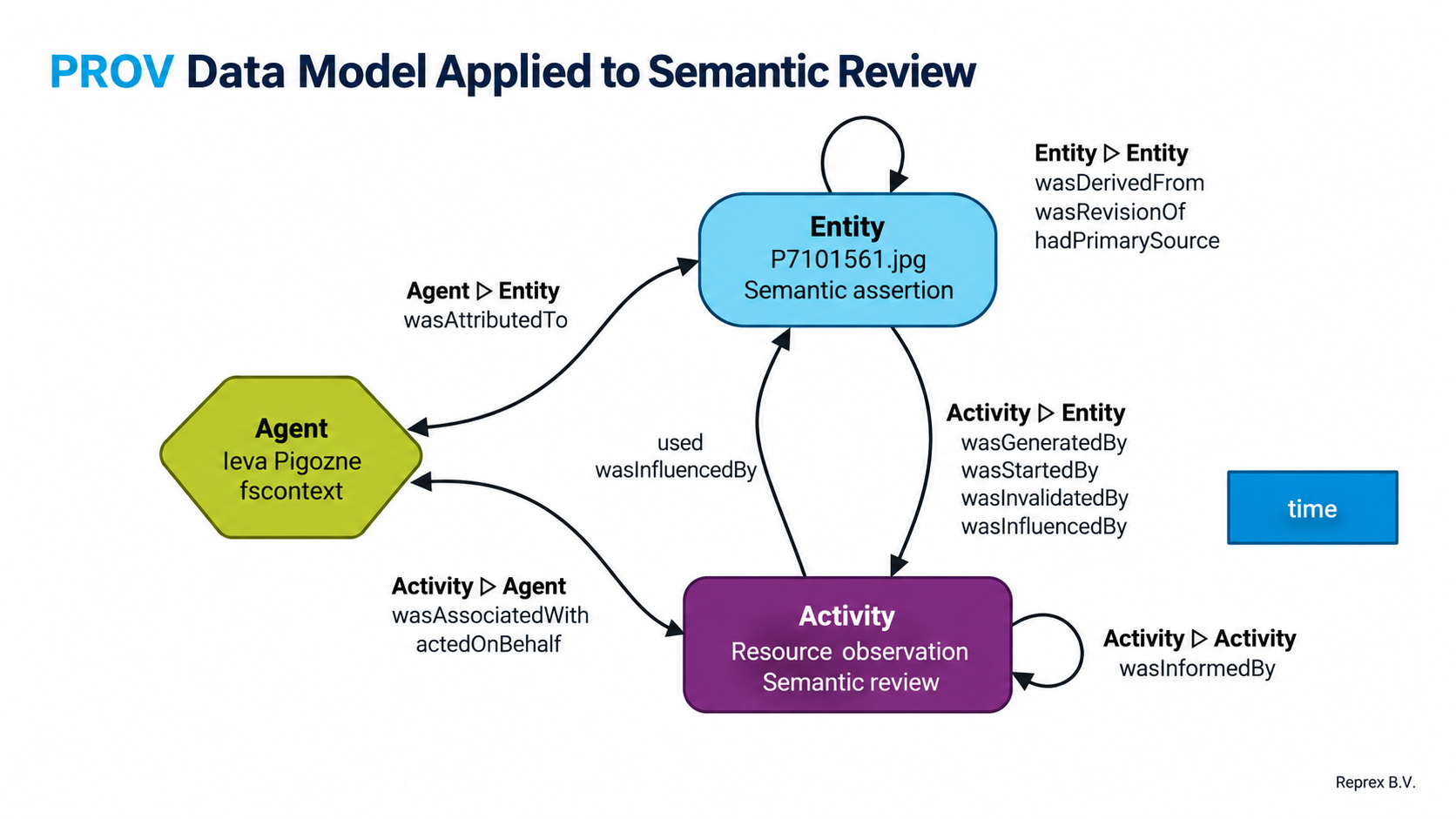
Review again the data
From review to status
The candidate and reviewed values are compared only after the human review.
| What happened? | Review status |
|---|---|
| The row has not yet been finalised | pending |
| The reviewer kept the proposed value | corroborated |
| The reviewer replaced it with another value | corrected |
| The reviewer deleted the proposed value | rejected |
| No optional descriptive assertion was made | deferred |
| The reviewer explicitly chose Defer | deferred |
| The reviewer explicitly chose Reject | rejected |
Explicit review decisions take precedence over the comparison of values.
Three views of the review
The same review can be projected as three aligned tables:
- candidate — what was proposed;
- reviewed — what the human reviewer retained or changed;
- status — what happened during review.
The same coordinate refers to the proposed assertion, its reviewed state, and the review decision.
From the review matrix to assertions
The reviewed matrix can be projected back into atomic assertions.
| subject | predicate | value | status |
|---|---|---|---|
| Delini farmhouse | instance_of | farmhouse | corroborated |
| Delini farmhouse | coordinates | … | corrected |
This is the bridge from a human review interface to machine-readable semantic knowledge.
BREAK
Representation and represented entity
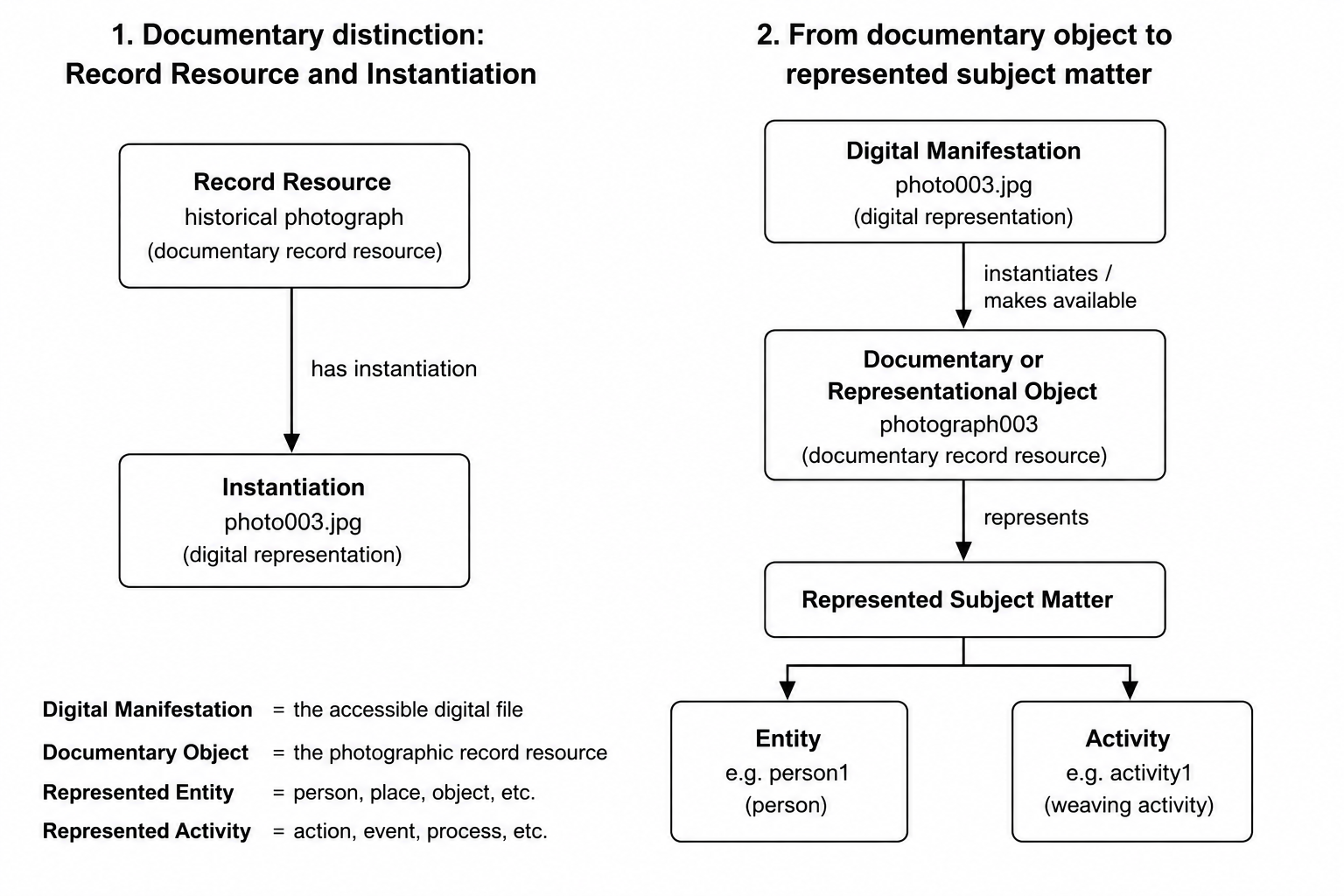
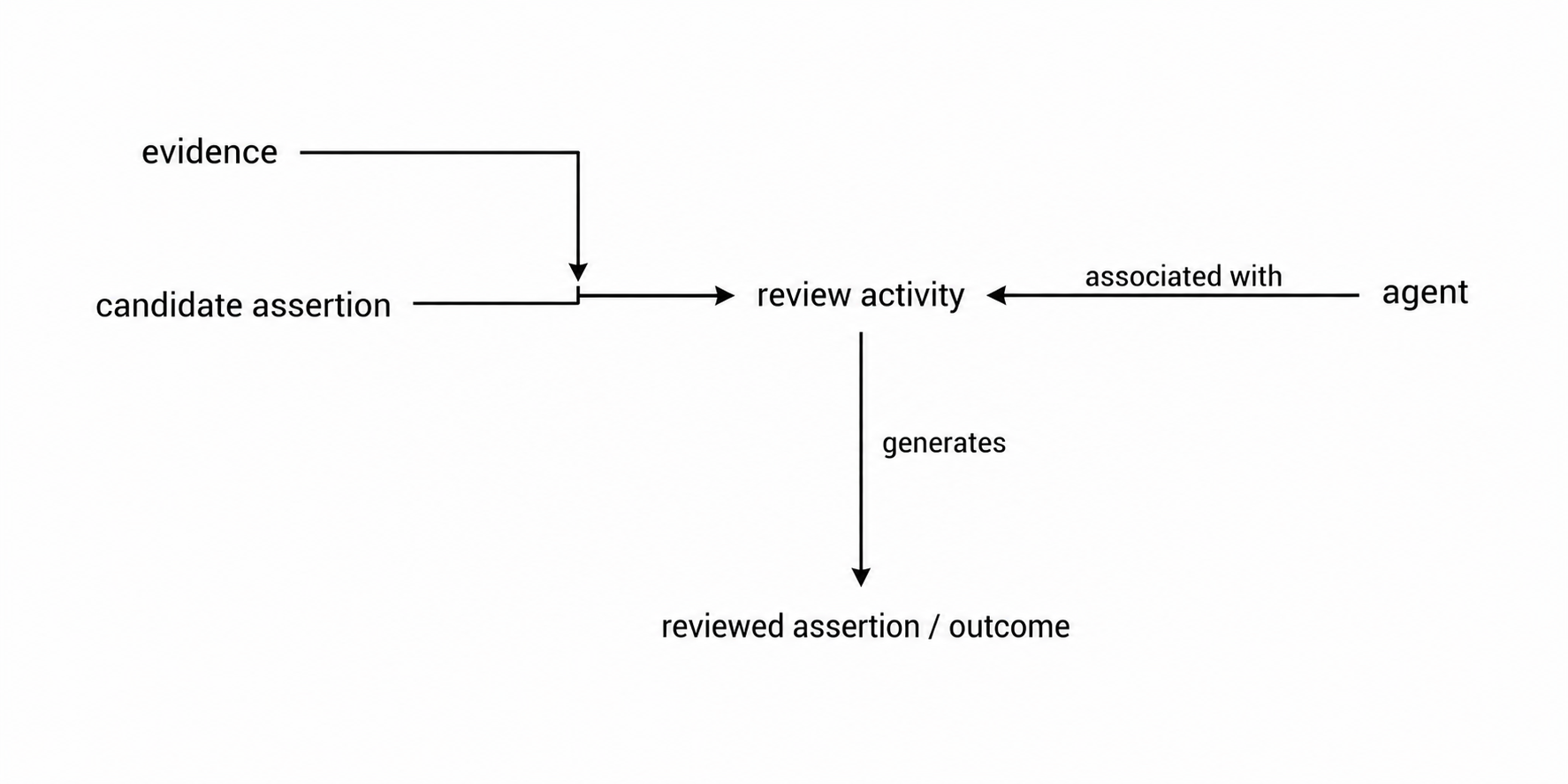
What is evidence?
Exercise Four
Long-form assertions
Review two proposed assertions about the Dēliņi farmhouse.
1. Open the exercise
EADH Workshop — Exercise 4
2. Examine the structure
Unlike the previous exercise, the predicates are no longer separate columns. Each row contains a predicate and a value.
3. Review the assertions
Review the proposed predicate and value in each row. Together with the subject, they form an atomic semantic assertion.
4. Save your work
Save a draft when you have reviewed the proposed assertions.
Evidence and the subject / provenance
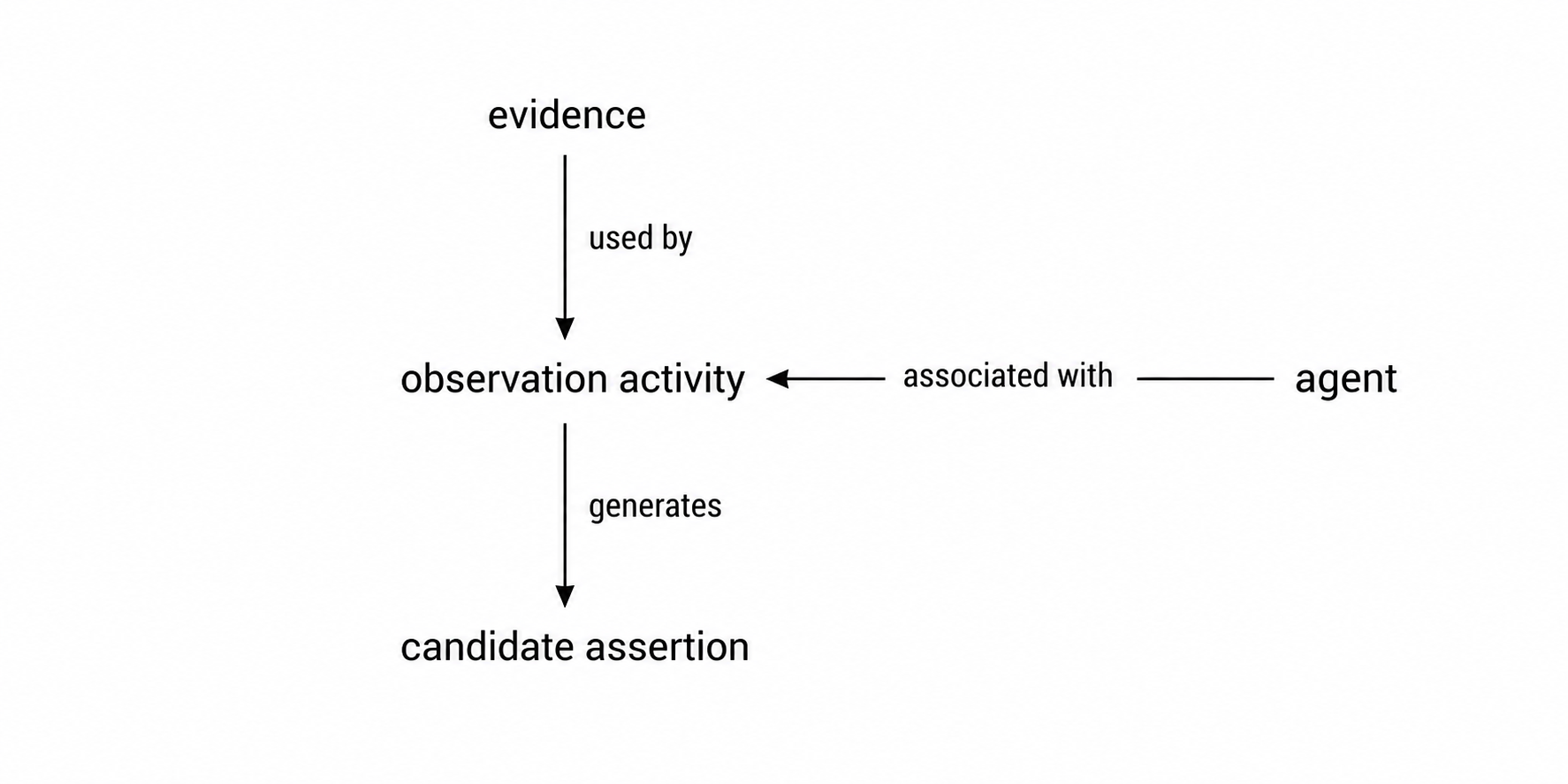
Filesystem observations
A digital file is also an observed entity.
fscontext records the filesystem context in which a file was observed:
- file name and path
- size and modification time
- media type
- checksum / content identity
The observation does not claim what the file means.
It establishes which digital object was available to the knowledge-production process at a particular point in time.
fscontext

A preserved web resource

Preserving an observation
A URL tells us where we found something.
It does not preserve what we saw.
A WACZ capture preserves the web resource as it was observed, including its content and capture context.
The preserved resource can therefore become part of the evidence trail.
What evidence was observed with what kind of competenece?
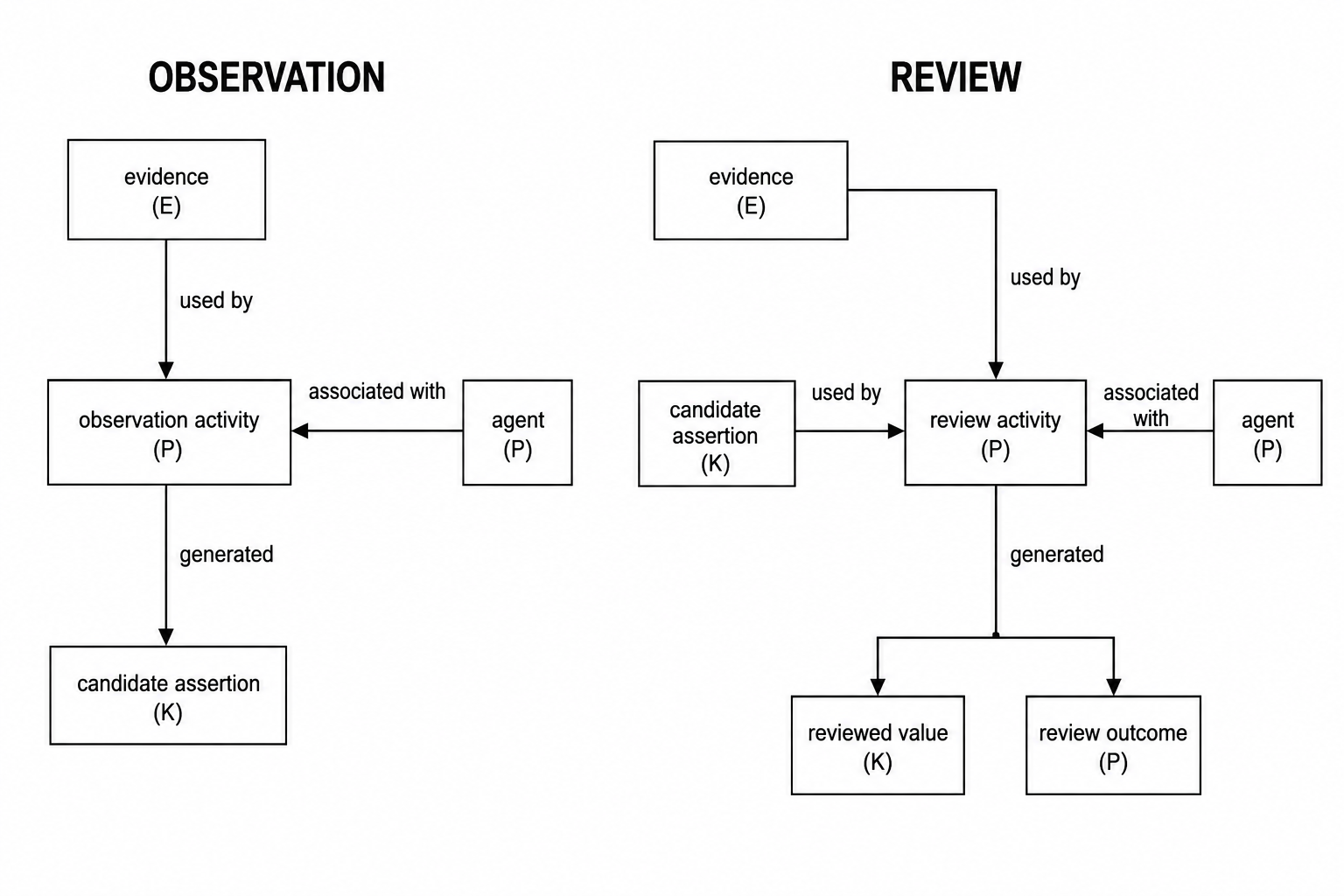
Normative Plane
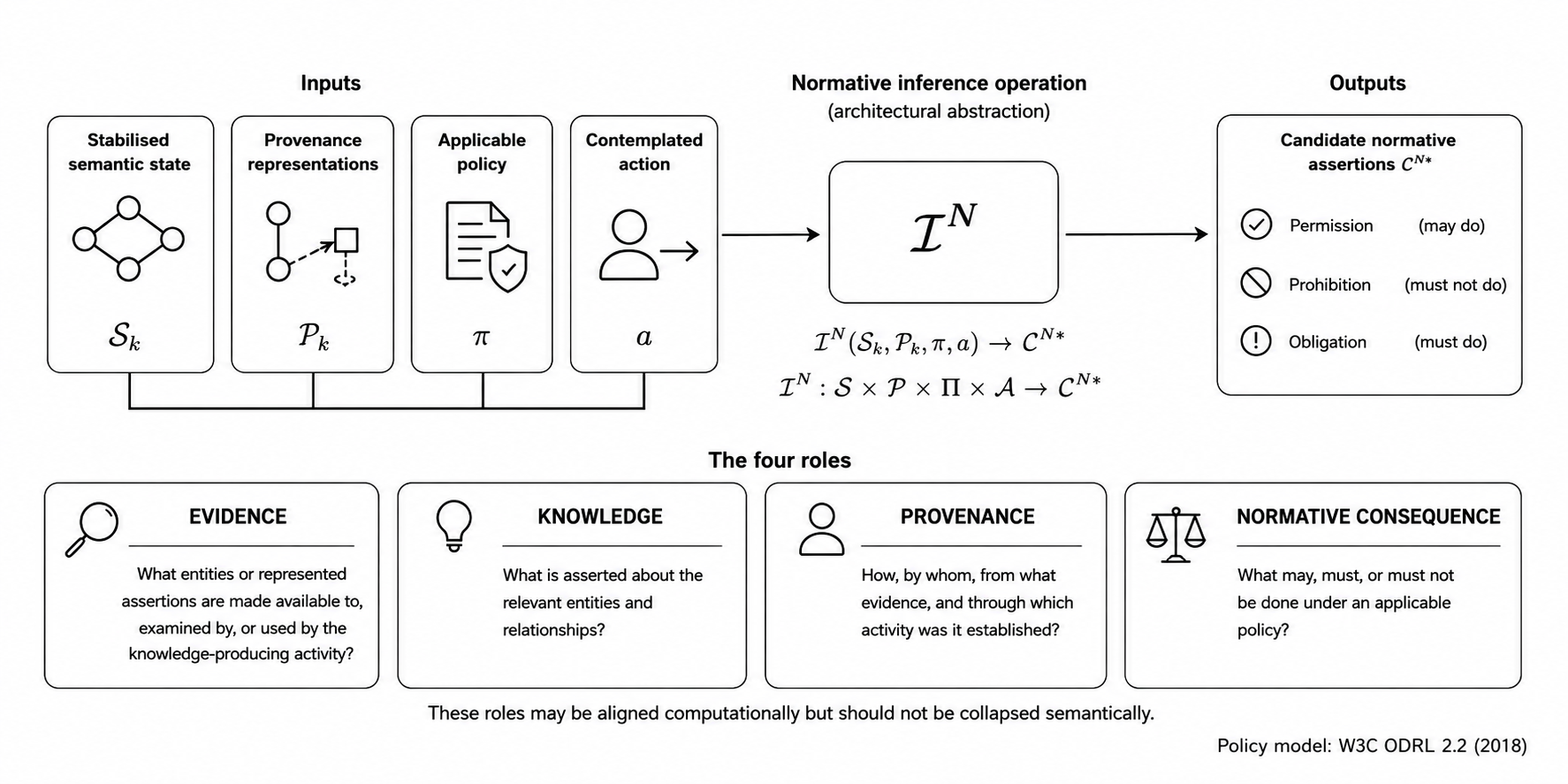
Modelling governance
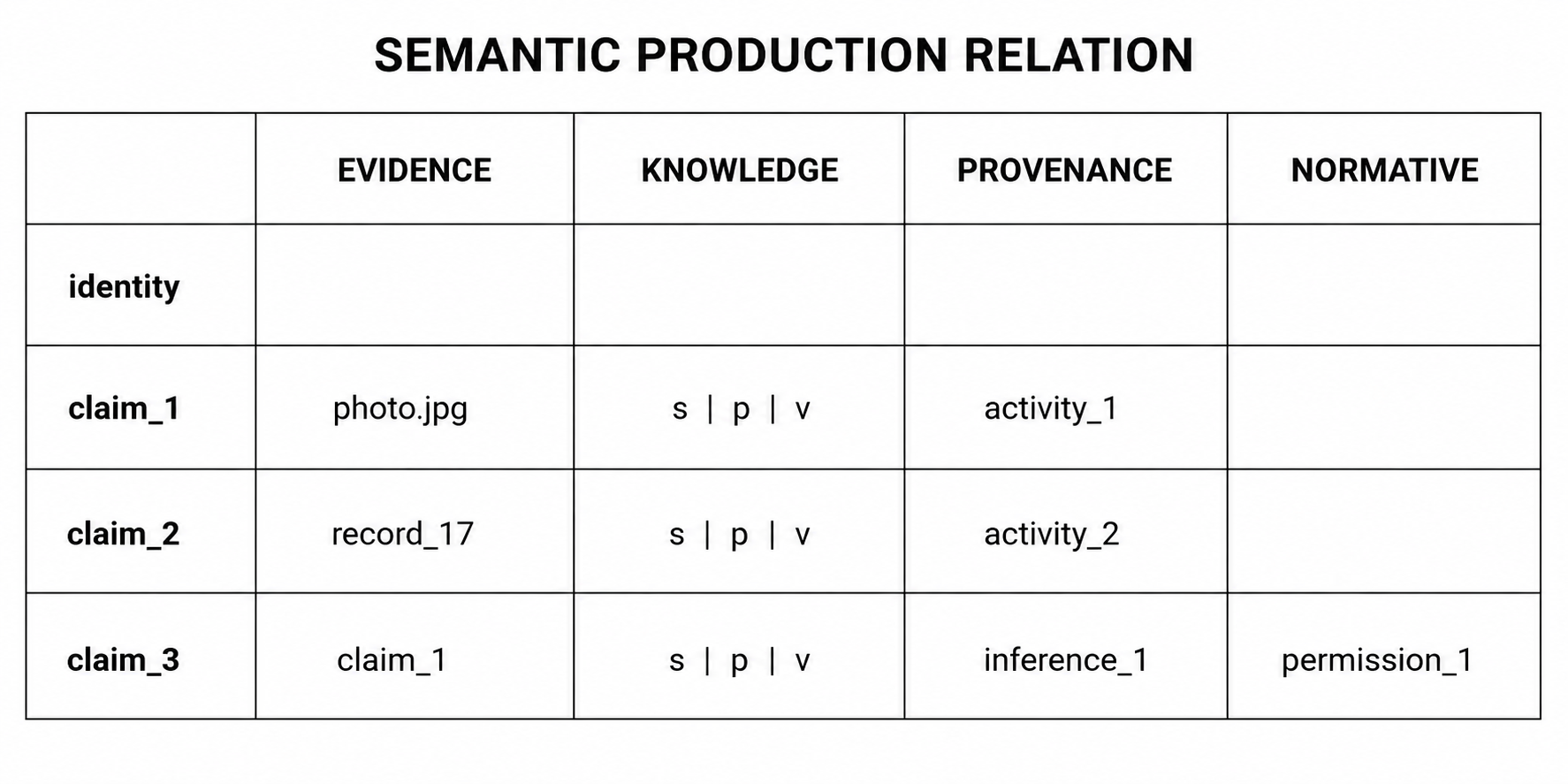
Authorship & other personal rights
A representation is not only about something. It is also made by someone, under particular conditions.
Once a representation may be published or reused, new questions appear:
Who created it? → authorship and attribution: in Europe, authors have rights concerning attribution, remuneration and the publication of their works.
Under what conditions may it be reused? → copyright and licensing.
Who or what is represented in it? → personality, privacy and consent; a CC BY licence on the representation may not be enough.
These are different assertions. They may require different evidence and may lead to different review decisions. Copyright, and related rights for sound and audiovisual recordings, concern rights in the representation. But the rights or legitimate interests associated with represented persons—and, in some jurisdictions, restrictions concerning represented works or objects, such as freedom-of-panorama rules—may also need to be considered together with the rights governing the representing medium.
Exercise Seven
Authorship and reuse rights
Review authorship and reuse rights for four photographs.
1. Open the exercise
EADH Workshop — Exercise 7
2. Examine the evidence
Use the photographs, descriptions and source records to determine their provenance.
3. Review the assertions
Review creator and use_rights separately. The creator of a photograph and the licence governing its reuse are different assertions.
4. Save your work
Save a draft when you have reviewed the proposed assertions.
Exercise Eight
Persons and personality rights
Review information about people depicted in photographs.
1. Open the exercise
EADH Workshop — Exercise 8
2. Examine the evidence and context
Use the photograph, description, evidence links and contextual names to understand who, if anyone, is depicted.
3. Review the assertions
Review whether recognisable people are present, whether they are identified, and whether any of them may still be alive.
4. Save your work
Save a draft when you have reviewed the proposed assertions.
Summary: Semantic Knowledge Production
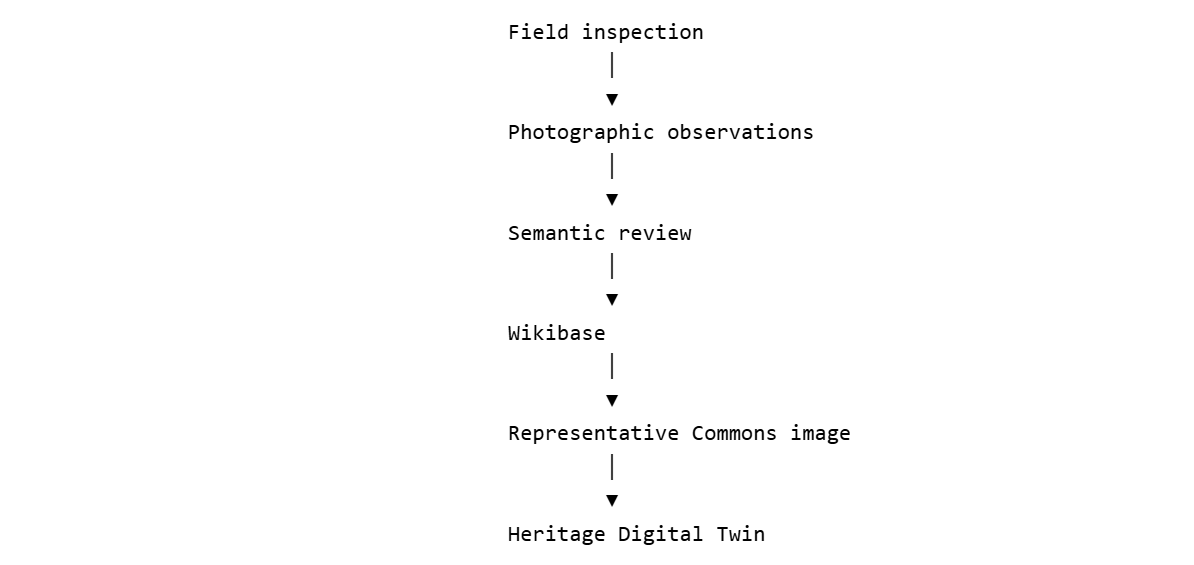
What exactly are we trying to build?
Heritage Digital Twin
A maintained, inspectable state of warranted knowledge about a heritage entity, explicitly connected to its evidence and to the processes through which that knowledge was established.
Linguistic warrant
Connects terms across languages and collections.
Evidential warrant
Connects evidence to claims about the heritage entity.
Competency warrant
Records the professional judgement needed to establish claims.
Four planes of knowledge production

Knowledge sharing: bounded federation
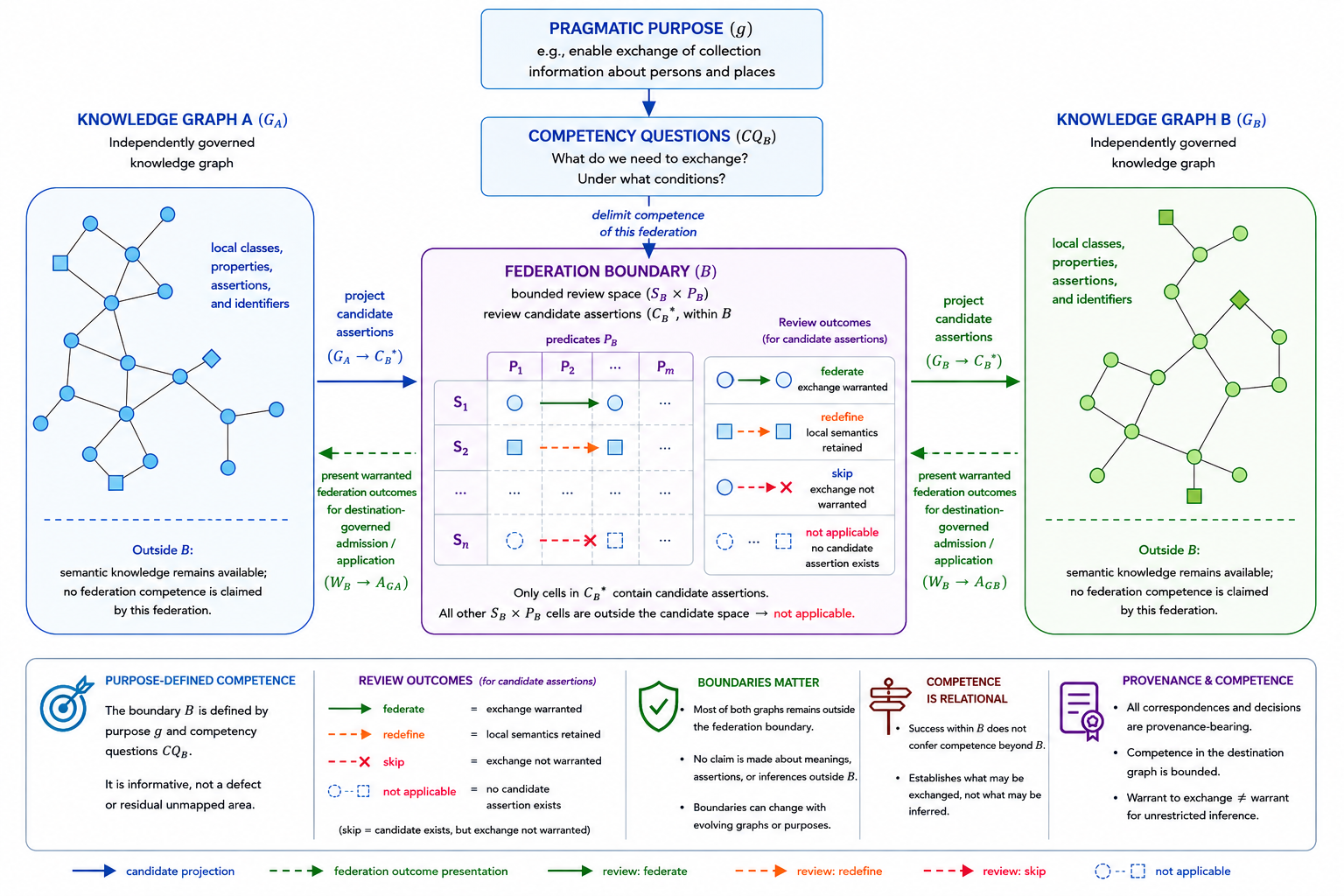
Bounded federation
Federation is defined relative to a pragmatic purpose and a set of competency questions.
Only candidate assertions within the federation boundary are reviewed for exchange.
Sharing knowledge without sharing an ontology
Two knowledge graphs may express the same proposition using different identifiers and vocabularies.
FUDSS
Q5613 P14 Q6
Wikidata
Q83326 P31 Q5
Both express:
Béla Bartók → instance of → human
But all three semantic components differ.
Mappings are also claims
To exchange the assertion we need three correspondences:
| FUDSS | Wikidata | |
|---|---|---|
| subject | Q5613 | Q83326 |
| predicate | P14 | P31 |
| value | Q6 | Q5 |
These mappings should not simply be hidden in transformation code.
They can themselves be proposed, reviewed, corrected, rejected or deferred.
References
References
Contact